Your webcam forgets. CamDial remembers.
A menu-bar app for USB webcam settings on the Mac — exposure, white balance, focus and zoom, set on the camera itself and saved as presets that come back on their own.
macOS 14.0 or later. Any USB (UVC) webcam, including one plugged into a MacBook. The MacBook’s own built-in camera and the Studio Display camera don’t expose hardware controls to any app, so they aren’t supported — the honest version is in the FAQ.

Same rows, same units, same behaviour as the popover in your menu bar — the real one just points at your own camera.
The reason it exists
Every reconnect, macOS forgets
Nothing on macOS remembers what you did to a webcam. Sleep the Mac, switch a hub, touch the cable — and the picture you spent ten minutes fixing is gone. It is the single most common complaint about every webcam tool ever shipped, and it is the one thing CamDial refuses to let happen.
Unplug, sleep, or a hub that blinks — and the camera comes back at the factory settings you spent ten minutes escaping.

CamDial notices the camera return, puts your look back on it, and tells you it did — with an undo, in case it guessed wrong.
Real units
Kelvins and fractions of a second, not percentages
“White balance: 62%” tells you nothing. CamDial reads the camera’s own range and shows you the value it actually means, so a look you like is a number you can write down, repeat, and explain to someone else.
Every slider maps the camera’s real minimum, maximum and step. Click a value to type one. Hold ⌥ while dragging for ten times the precision.

Hardware, not filters
It changes the camera, not the picture
CamDial sends standard control requests to the camera over USB. There is no virtual camera to pick from a menu, no filter layer, no second video pipeline eating your CPU and adding a half-second of delay. You set the camera once; every app that opens it afterwards gets what you set.
- Zoom
- Google Meet
- Teams
- OBS
- QuickTime
- FaceTime
And because the controls live in the camera, they keep working while something else is streaming from it — you can fix your exposure in the middle of a call and watch it change.
Honest controls
No dead gray sliders
Cameras differ wildly in what they let software touch. Most apps in this category show you every control and gray out the ones your camera refuses — which looks exactly like a bug. CamDial shows the controls your camera actually supports, and when something is missing it says so in words.
On a cheap camera with no focus or zoom, the stack fills out with what does move the picture — brightness and gain, the two that rescue a dark room. Under flickering light, Anti-flicker set to 50 Hz or 60 Hz takes the bands out.

Per-app rules · Pro
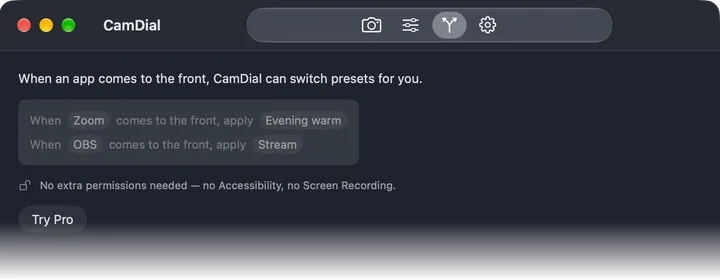
When Zoom comes forward, your look comes with it
A meeting look for Zoom, a warmer one for the evening, a flat one for OBS. Write it once as a sentence — when Zoom comes to the front, apply Evening warm — and stop thinking about it. When the app goes away, CamDial can put back what you had.
Compatibility
One app for the whole camera drawer
Any standard USB video camera works, on any Mac that runs macOS 14 — MacBook, iMac, Mac mini or Mac Studio. The ones with a brand on the box, and the one you bought for eleven dollars to test a second angle.
- Logitech C920
- C922
- Brio
- Elgato Facecam
- Razer Kiyo
- Anker
- NexiGo
- …and any other UVC camera
Privacy
It has no reason to go online, so it doesn’t
No account, no sign-in, no analytics, no network access at all. The live preview exists only while a window showing it is open, and the camera light goes out with it — nothing is recorded and nothing is sent anywhere. The App Store label reads Data Not Collected, and that is a statement about the code, not a promise about our intentions.
Read the privacy policy — it is shorter than this page.
Free and Pro
Free to start. Pro is a one-time unlock — no subscription.
Free
- Every manual control your camera supports
- One preset per camera
- Automatic reapply when a camera reconnects
- Live preview and mid-call editing
Pro
- Unlimited presets
- Per-app rules
- Keyboard shortcuts for presets, from any app
- Hold your settings against other apps
- macOS 27 support included, Family Sharing on
One purchase, yours forever. Bought inside the app through the App Store, so refunds go through Apple like everything else.
Questions people actually ask
- Does CamDial work with the built-in camera on my MacBook or iMac?
- No — and neither does anything else. Apple’s built-in cameras — in a MacBook, an iMac or the Studio Display — don’t expose hardware controls to any app on macOS, so no third-party app can change their exposure, white balance or focus. Plug a USB webcam into your MacBook and CamDial controls that one. If the built-in camera is what you came for, we’d rather you know now than after you download.
- My webcam settings reset every time. Does CamDial actually fix that?
- That is the problem it was built for. Save your settings as a preset once, and CamDial puts them back on its own — when the camera reconnects after a sleep or an unplug, and, with a per-app rule, when your meeting app comes to the front. You get a quiet notification telling you it happened, with an undo.
- Which webcams work?
- Any standard USB video (UVC) camera: Logitech C920, C922 and Brio, Elgato Facecam, Razer Kiyo, Anker, NexiGo, and the no-name camera in your drawer. Cameras differ in what they let software change — CamDial shows the controls yours actually supports and says so plainly when one is missing, instead of showing a dead gray slider.
- Do the settings apply in Zoom, Google Meet, Teams and OBS?
- In all of them, without choosing anything. CamDial adjusts the camera itself over USB — there is no virtual camera to select, no filter layer, no extra video pipeline. Whatever opens your camera next gets the picture you set: Zoom, Google Meet, Teams, OBS, QuickTime, FaceTime.
- Can I adjust the picture in the middle of a call?
- Yes. Hardware controls keep working while another app is streaming from the camera, so you can open CamDial mid-call, fix your exposure and watch it change. CamDial never changes the camera’s stream itself while another app is using it.
- Do I need to install a driver?
- No. USB webcams speak a standard macOS already understands — CamDial sends it the standard control requests over USB. Nothing to install beyond the app, no kernel extension, no restart.
- What does CamDial cost?
- Free to start: full manual controls, one preset per camera, and automatic reapply on reconnect. Pro is a one-time unlock — unlimited presets, per-app rules, keyboard shortcuts for presets, and the option to hold your settings against other apps, with macOS 27 support included. No subscription. Family Sharing is on.
Set it once. Let it remember.
Get CamDialmacOS 14.0 or later · Free to start · Questions go to support.